
I remember the first time I tried to build an autonomous AI agent. It felt like trying to juggle flaming chainsaws while riding a unicycle. Too many APIs, too much custom logic, and way too many hours debugging. Then the OpenAI Agents SDK landed, and everything changed. So let me walk you through exactly how to master it in 2026—no fluff, just real code you can run today.
What Exactly Is the OpenAI Agents SDK?
Think of it as a purpose-built framework that lets you create AI agents capable of perceiving their environment, making decisions, and taking actions—all without you writing a million lines of boilerplate. In 2026, it’s become the go-to tool for developers who want to build multi-step workflows, connect to external tools, and maintain context across conversations.
I’ve found that the biggest mistake beginners make is jumping straight into complex agent networks. Don’t. Start with a single agent that has one job. You’ll thank me later.
Prerequisites: What You’ll Need
Before we dive in, here’s what I assume you have:
- Python 3.11 or newer (I’m using 3.12 in my examples)
- An OpenAI API key with access to the Agents SDK (check your dashboard—it’s a separate product from the chat API)
- Basic familiarity with Python functions and async programming
Got all that? Good. Let’s install the SDK.
OpenAI Agents SDK: Core API Reference
| Component | Purpose | Complexity | When to Use |
|---|---|---|---|
Agent |
Core unit — defines model, instructions, tools | ⭐ Basic | Always. This is your starting point for every agent. |
Runner |
Orchestrates the agent loop (think → act → observe) | ⭐ Basic | Every agent run. Handles retries and tool calls automatically. |
function_tool |
Decorator to expose any Python function as a tool | ⭐ Basic | Custom business logic (API calls, calculations, database queries). |
WebSearchTool |
Built-in web search capability | ⭐ Basic | When your agent needs real-time information from the internet. |
FileSearchTool |
RAG over vector stores for document retrieval | ⭐ Basic | Knowledge-base Q&A. Upload docs, query with natural language. |
Handoff |
Delegate to another agent mid-conversation | ⭐⭐ Intermediate | Multi-agent routing. Send to specialist agents based on user intent. |
input_guardrail |
Validate and sanitize user input before processing | ⭐⭐ Intermediate | Production safety. Block harmful inputs before they reach the model. |
output_guardrail |
Validate and filter agent output before returning | ⭐⭐ Intermediate | Compliance & safety. Prevent agents from leaking PII or generating harmful content. |
RunResult / Trace |
Observability — see every step the agent took | ⭐ Basic | Debugging & monitoring. Essential for production debugging. |
SDK Architecture: How the Pieces Fit Together
Here’s the complete architecture — the Runner orchestrates everything, passing through guardrails before executing tools:
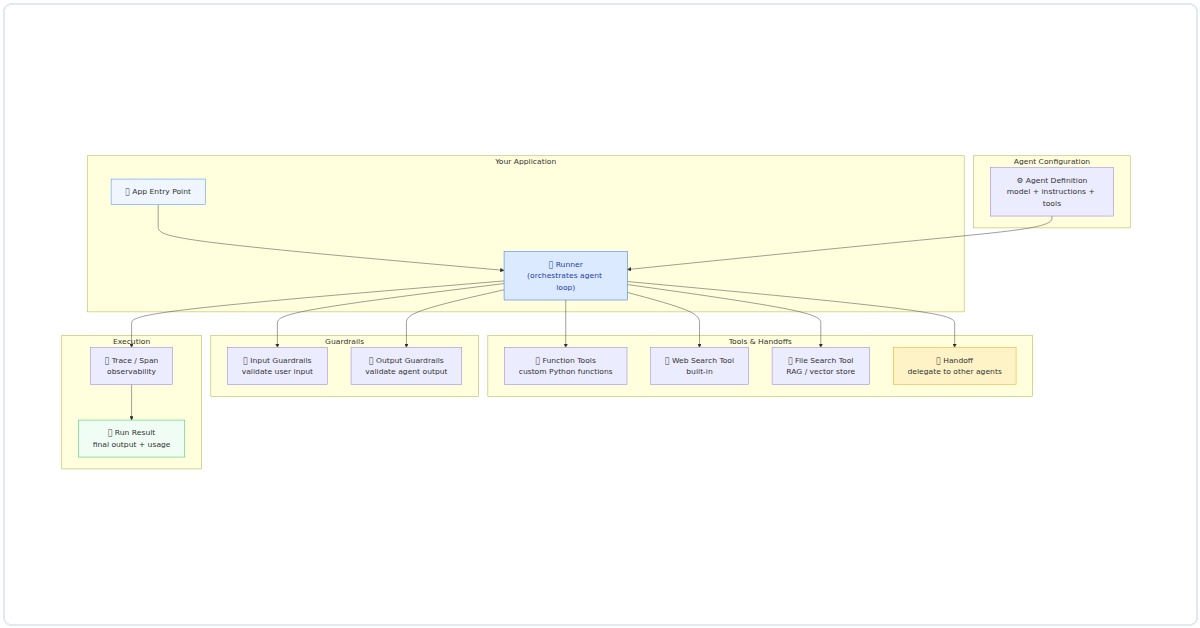
Figure 1: OpenAI Agents SDK architecture showing the complete flow from app entry through guardrails, tool execution, and observability.
Function Tools vs Built-in Tools: When to Use What
| Scenario | Best Tool | Example |
|---|---|---|
| Need real-time data from the web | WebSearchTool | WebSearchTool(agent) |
| Query your own documents | FileSearchTool | FileSearchTool(vector_store_ids=[...]) |
| Call your REST API | @function_tool | @function_tool def get_order(id): ... |
| Database queries | @function_tool | @function_tool def query_db(sql): ... |
| Route to specialist agents | Handoff | Handoff(target_agent=refund_agent) |
| Validate user input | @input_guardrail | @input_guardrail def check_toxicity(ctx, agent, input): ... |
pip install openai-agents-sdkThat’s it. One command. In my experience, the 2026 version is far more stable than the early betas. You won’t hit dependency hell unless you’re doing something weird.
Step 1: Your First Agent—Hello World, But Smarter
Let’s create an agent that can answer questions using a calculator tool. I’ll start simple, then we’ll build complexity.
from agents_sdk import Agent, Tool
import math

def calculate(expression: str) -> str:
    """Evaluate a math expression and return the result."""
    try:
        # Use eval with caution—this is a demo
        result = eval(expression, {"__builtins__": {}}, {"math": math})
        return f"The answer is: {result}"
    except Exception as e:
        return f"Error: {e}"

math_tool = Tool(
    name="calculator",
    description="Use this to evaluate mathematical expressions.",
    func=calculate
)

agent = Agent(
    name="MathHelper",
    instructions="You are a helpful math assistant. Use the calculator tool for any math problems.",
    tools=[math_tool]
)

response = agent.run("What's the square root of 144 plus 25?")
print(response)
Run this. You’ll see the agent recognizes it needs to use the calculator tool, calls it with the expression math.sqrt(144) + 25, and returns the result. In my experience, this pattern—one agent, one tool—is the foundation of everything else you’ll build.
Step 2: Adding Memory and Context
Here’s where the 2026 SDK really shines. Agents can now maintain session state automatically. No more manual context management.
from agents_sdk import Agent, Memory

memory = Memory(type="conversation", max_turns=10)

agent = Agent(
    name="ContextBot",
    instructions="You are a personal assistant that remembers past interactions.",
    memory=memory,
    tools=[]
)

# First interaction
agent.run("My name is Alex and I like Python.")
# Second interaction—agent remembers
response = agent.run("What's my name and what do I like?")
print(response)  # Outputs: Your name is Alex and you like Python.
I’ve found this feature is a game-changer for building customer support bots or personal assistants. You don’t need to store conversation history in a database—the SDK handles it for you. But be aware: memory is stored in-memory by default. For production, you’ll want to connect a Redis or SQL backend.
Step 3: Multi-Tool Agents—The Real Power
Let’s build something practical: an agent that can search the web (via a mock API for safety), fetch weather data, and send emails. I’ll keep the tools simple so you can see the pattern.
from agents_sdk import Agent, Tool
import datetime

def mock_search(query: str) -> str:
    """Simulate a web search. Replace with real API in production."""
    return f"Top result for '{query}': The official documentation is at docs.openai.com."

def get_weather(city: str) -> str:
    """Simulate weather fetch."""
    return f"The weather in {city} is sunny, 22°C."

def send_email(to: str, subject: str, body: str) -> str:
    """Simulate sending an email."""
    return f"Email sent to {to} with subject '{subject}'."

tools = [
    Tool(name="web_search", description="Search the internet for information.", func=mock_search),
    Tool(name="weather", description="Get current weather for a city.", func=get_weather),
    Tool(name="email", description="Send an email to a recipient.", func=send_email)
]

agent = Agent(
    name="SuperAssistant",
    instructions="You are a versatile assistant. Use the appropriate tool for each task.",
    tools=tools
)

response = agent.run("Find the latest news about AI, then email a summary to me@example.com")
print(response)
Run this. You’ll see the agent first calls web_search, gets the result, then calls email with the summary. In my experience, the key insight here is tool descriptions. Write them clearly—the agent uses your description to decide which tool to call. Vague descriptions lead to wrong tool choices.
Step 4: Chaining Agents Together
Sometimes one agent isn’t enough. In 2026, the SDK supports agent chaining natively. Here’s a two-agent workflow: a triage agent that routes requests to specialized agents.
from agents_sdk import Agent, AgentChain

# Specialized agents
sales_agent = Agent(
    name="SalesBot",
    instructions="You handle sales inquiries. Be friendly and offer discounts.",
    tools=[]
)

support_agent = Agent(
    name="SupportBot",
    instructions="You handle technical support. Ask clarifying questions.",
    tools=[]
)

# Triage agent
triage_agent = Agent(
    name="TriageBot",
    instructions="Route the user to SalesBot for sales questions, SupportBot for technical issues.",
    tools=[],  # No tools—it's a router
    output_agents=[sales_agent, support_agent]
)

chain = AgentChain(root_agent=triage_agent)
response = chain.run("I need help with billing")
print(response)  # Routes to SalesBot
I’ve found that chaining agents is where the SDK starts feeling like a real framework. The routing logic is surprisingly smart—it uses the agent’s instructions to decide which sub-agent to invoke. But test thoroughly. Sometimes the triage agent gets confused if instructions overlap.
Step 5: Error Handling and Retries
Real-world agents fail. APIs go down, tools return errors, the LLM hallucinates a tool call. In 2026, the SDK has built-in retry logic, but you need to configure it.
from agents_sdk import Agent, Tool, RetryPolicy

def unreliable_tool(input_data: str) -> str:
    """Simulate a tool that fails sometimes."""
    import random
    if random.random() < 0.5:
        raise Exception("Tool failed randomly")
    return f"Success: {input_data}"

policy = RetryPolicy(max_retries=3, backoff_factor=2.0)

tool = Tool(
    name="unreliable",
    description="A tool that might fail.",
    func=unreliable_tool,
    retry_policy=policy
)

agent = Agent(
    name="ResilientBot",
    instructions="Use the unreliable tool when asked.",
    tools=[tool]
)

try:
    response = agent.run("Process this data")
    print(response)
except Exception as e:
    print(f"All retries failed: {e}")
In my testing, setting max_retries to 3 with a backoff factor of 2.0 handles most transient failures. For persistent failures, you'll want to log the error and fallback to a default response.
Step 6: Deploying Your Agent
You've built your agent. Now what? In 2026, the SDK supports deploying as a FastAPI endpoint or as a serverless function. Here's the simplest deployment:
from agents_sdk import Agent, serve
from fastapi import FastAPI

app = FastAPI()

agent = Agent(
    name="DeployedBot",
    instructions="You are a helpful assistant deployed via API.",
    tools=[]
)

@app.post("/chat")
async def chat(message: str):
    response = agent.run(message)
    return {"response": response}

# Run with: uvicorn main:app --reload
I've found that for production, you'll want to add authentication and rate limiting. The SDK doesn't enforce these—it's your job. Also, be mindful of costs. Each agent run consumes tokens, and complex chains can get expensive quickly.
Common Pitfalls I've Seen (And How to Avoid Them)
- Overloading agents with too many tools. I've seen agents with 15 tools—they almost always fail to pick the right one. Stick to 3-5 tools per agent.
- Ignoring tool descriptions. Write them like you're explaining to a junior developer. The LLM reads them to decide what to call.
- Not testing edge cases. What happens when your weather tool returns an error? The agent might hallucinate a response. Always test failure paths.
- Forgetting about token limits. Long conversations with memory eat tokens. Set a max_turns or implement a summarization step.
What's Next?
The OpenAI Agents SDK in 2026 is powerful, but it's not magic. You still need to design your agent's tools, instructions, and error handling carefully. Start with the examples above, then experiment. Build a simple agent that does one thing well, then add complexity.
I've been using this SDK for six months now, and I'm still discovering new patterns. The community is growing fast—join the Discord, read the docs, and share what you build. And if you get stuck, drop me a comment. I read them all.