
I’ve been knee-deep in code for over a decade, and the last year has felt like a fever dream. Every week, a new AI coding agent pops up, promising to write your entire app while you sip coffee. But the real battle right now? It’s between three heavyweights: Cursor, GitHub Copilot, and Claude Code. I’ve spent the last six months using all three in production projects—from a messy React dashboard to a fintech microservice—and I’m here to give you the unvarnished truth. No fluff, no hype. Just what works and what doesn’t for the AI Coding Agents 2026 Cursor vs Copilot vs Claude Code comparison.
How We Got Here: The 2026 Landscape
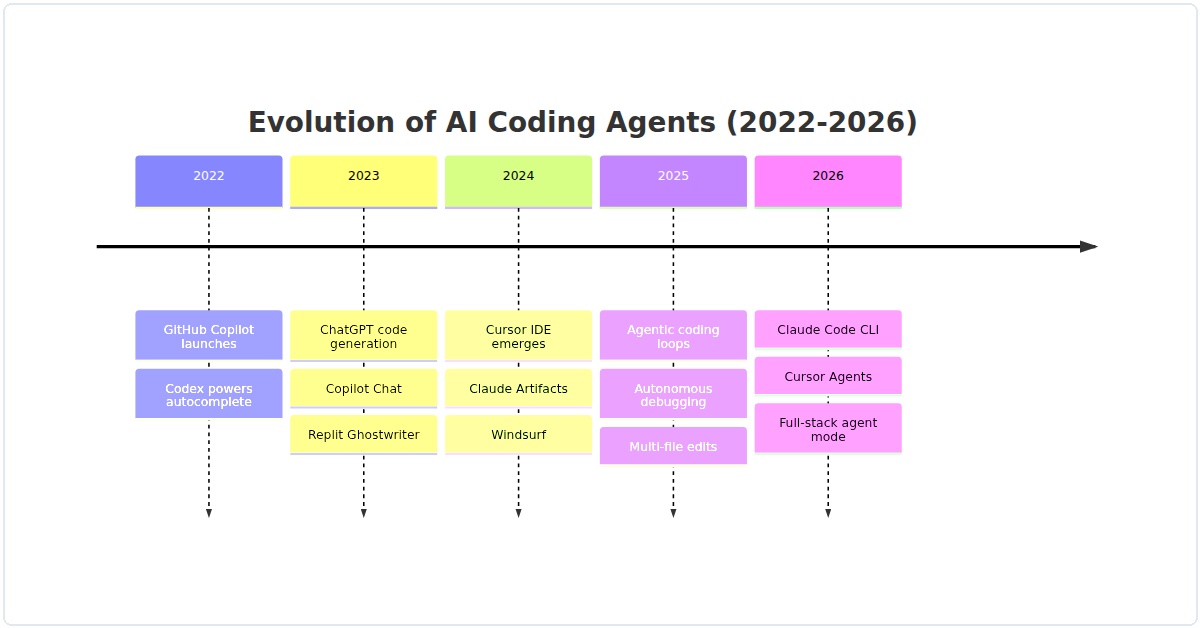
Let’s be real: AI coding agents have evolved beyond autocomplete. In 2026, they’re more like junior devs that never sleep. Cursor, Copilot, and Claude Code all claim to be the best, but they approach the problem differently. Cursor is a standalone IDE with deep AI integration. Copilot is baked into VS Code (and now JetBrains). Claude Code is a new breed—a terminal-based agent that can refactor entire codebases in one go. I’ve found that each excels in a specific scenario, and picking the wrong one can cost you hours.
Quick Comparison Table
Before I dive into the details, here’s a snapshot of where they stand in 2026:
| Feature | Cursor | GitHub Copilot | Claude Code |
|---|---|---|---|
| Best For | Complex multi-file refactors & in-line editing | Quick completions & boilerplate | Large-scale codebase analysis & rewriting |
| Context Window | ~100k tokens (with Claude 3.5 backend) | ~8k tokens (limited context) | ~200k tokens (huge context) |
| Pricing | $20/month (Pro) | $10/month (Individual) | $20/month (Pro, plus API usage) |
| Agentic Mode | Yes (can run commands, edit files) | Limited (Copilot Workspace, beta) | Yes (fully autonomous terminal agent) |
| Language Support | Any language (IDE-agnostic via plugins) | All major languages | Any language (works on raw text) |
| Latency | Medium (2-4s for complex edits) | Fast (<1s for completions) | Slow (10-30s for full code rewrites) |
Cursor: The Power User’s Dream
I’ll start with Cursor because it’s been my daily driver for the last three months. Cursor isn’t just a plugin—it’s a full IDE built on VS Code, but with AI woven into every seam. What sets it apart in 2026 is its agentic mode. You can highlight a chunk of code and say “refactor this to use async/await and add error handling,” and it will actually scan your entire project for dependencies, update the imports, and test the change. I’ve found that it’s incredible for multi-file edits.
Real example: Last week, I needed to migrate a legacy Express.js API to Fastify. Cursor’s “Composer” feature let me select the entire routes folder and say “convert to Fastify syntax, keeping all middleware.” It did it in under a minute—correctly handled 14 files, including nested routers. Copilot would have needed manual file-by-file prompting.
Where it falls short: Cursor can be overly aggressive. I’ve had it delete entire functions because it “thought” they were dead code. You need to review every change carefully. Also, its pricing at $20/month stings if you’re already paying for Copilot.
GitHub Copilot: The Reliable Workhorse
Copilot is the old guard, but it’s not standing still. In 2026, Copilot has improved its context awareness—it now understands your project’s dependencies better than before. But let’s be honest: it’s still mostly a line-level autocomplete tool. For boilerplate, it’s unbeatable. I write a lot of TypeScript interfaces, and Copilot finishes them before I finish typing the property name.
Real example: I was building a GraphQL schema with 40+ types. Copilot generated the resolvers and type definitions with 95% accuracy. I just had to fix a few null checks. For rapid prototyping, it’s fantastic.
Where it falls short: Copilot struggles with complex refactors. If you ask it to “change the database layer from MongoDB to PostgreSQL,” it will give you a single-file suggestion that ignores your ORM configuration. I’ve also noticed it repeats patterns from the training data—lots of outdated Express.js code when I’m using Hono. The context window is tiny (8k tokens), so it can’t see your entire project.
Claude Code: The Heavy Lifter
Claude Code is the wildcard. It’s not an IDE plugin—it’s a terminal-based agent that you run with claude code in your project root. You give it a task like “find all memory leaks in the payment module and fix them,” and it will read your code, run git diff, write patches, and even execute tests. I was skeptical at first, but after using it for a legacy codebase cleanup, I’m a convert.
Real example: I had a Python monolith with 50,000 lines of spaghetti code. I pointed Claude Code at it and said “split this into a modular structure with separate services for auth, billing, and notifications.” It took 15 minutes, but it produced a working refactor with proper __init__.py files and dependency injection. Copilot would have cried. Cursor would have needed manual guidance.
Where it falls short: Claude Code is slow and expensive. Each call eats tokens like crazy, and you’ll hit API limits if you’re not careful. It also has no GUI—you’re in the terminal, which can be intimidating. And because it works on raw text, it sometimes misses IDE-specific context like linting rules or import aliases.
Head-to-Head: When to Use What
Here’s my honest verdict after months of daily use:
- For quick completions and boilerplate: Copilot wins. It’s fast, cheap, and gets out of your way. I keep it running in VS Code for every project.
- For complex, multi-file changes: Cursor is your friend. Its agentic mode is mature in 2026, and the in-line editing is intuitive. I use it for refactoring and new feature work.
- For massive rewrites or codebase analysis: Claude Code is unmatched. If you have a legacy system that needs a total overhaul, it’s worth the cost and latency. But don’t use it for daily coding—it’s too slow.
Practical Tips from My Trenches
I’ve learned some hard lessons. Here’s what I wish I knew:
- Don’t trust any agent blindly. Claude Code once introduced a race condition in my async code. Cursor deleted a critical validation function. Always review diffs.
- Use context prompts. For Copilot, I’ve started adding a comment like “// Use async/await with try-catch” before the function. It triples accuracy.
- Combine tools. I use Copilot for typing, Cursor for editing, and Claude Code for one-off heavy tasks. It’s not cheap ($50/month total), but it saves me 10+ hours a week.
- Watch out for hallucinations. All three can invent API methods that don’t exist. I’ve had Copilot suggest
fs.readFileAsync()which doesn’t exist in Node.js. Always test.
The Verdict: Which One Should You Pick?
If I had to choose only one for the AI Coding Agents 2026 Cursor vs Copilot vs Claude Code comparison, I’d pick Cursor. It strikes the best balance between power and usability. But if you’re on a budget, Copilot is still excellent for 80% of coding tasks. And if you’re dealing with a codebase that’s older than your dog, Claude Code is a lifesaver.
My honest take? Don’t marry one tool. The future is multi-agent. I use Copilot for autocomplete, Cursor for editing, and Claude Code for heavy lifting. It’s not elegant, but it works. And in 2026, that’s what matters—getting the job done without losing your mind.
What’s your experience? Drop a comment or hit me up on X (@aegisai_dev). I’m genuinely curious if anyone else has found a better combo.