
Building AI agents used to mean wrestling with complex frameworks, spending weeks on infrastructure, and a whole lot of frustration. Not anymore. In 2026, you can go from having an idea to having a working agent in a single afternoon. I’ve done it, and I’ll show you exactly how. This guide covers the practical path — the tools that actually work, the mistakes you’ll want to avoid, and the workflow that gets results.
What You’ll Build Today
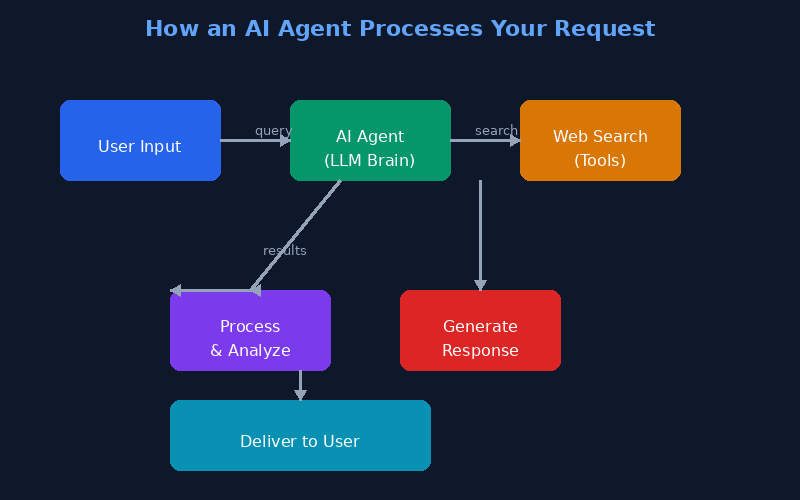
By the end of this guide, you’ll have built a personal research agent. Give it a topic, and it will search the web, read articles, and deliver a concise summary with key takeaways. It’s practical, it’s achievable in a few hours, and it teaches you everything you need to know for more ambitious projects.
What You’ll Need
| Requirement | Details |
|---|---|
| Computer | Any modern laptop or desktop. Windows, Mac, or Linux. |
| Python | Version 3.10 or newer. Free from python.org. |
| API Key | OpenAI, Anthropic, or Google. Most offer free credits to start. |
| Time | About 2-3 hours. Less with a no-code platform. |
| Terminal | Basic familiarity with opening and running commands. |
That’s it. No expensive hardware, no paid software subscriptions (beyond the API credits, which are minimal for testing).
Step 1: Pick Your First Tool
This is the single most important decision you’ll make. Here’s my honest recommendation based on where you are today:
| Your Skill Level | Best Tool | Why |
|---|---|---|
| Never coded before | Zapier Central or Dify.ai | Visual builders. Drag, drop, connect. Zero code. |
| Know some Python | CrewAI | Free, open-source, multi-agent. ~30 lines of code. |
| Experienced developer | LangChain or OpenAI SDK | Full control, but steeper learning curve. |
For this tutorial, I’ll use CrewAI since it’s the best balance of power and simplicity. But the concepts transfer to any framework.
Step 2: Install and Set Up
Open your terminal and run:
pip install crewaiThat’s it. One command. Then create a new project:
crewai create research-agentThis creates a folder with a basic template. Change into that directory and look at the files. You’ll see agents.py where you define your agents, and tasks.py where you define what they need to do.
If you’re using a no-code platform, skip the terminal and create a new project from their web interface. The concepts are identical — you’re just using a visual canvas instead of code.
Step 3: Define Your Agent
Open agents.py and you’ll see something like this:
researcher = Agent(
    role='Research Analyst',
    goal='Research topics thoroughly and provide accurate summaries',
    backstory='You are an experienced research analyst...',
    tools=[search_tool],
    verbose=True
)
Customize the role and goal. The key fields are:
- role — Who is this agent? Be specific. ‘Research Analyst’ is better than ‘Assistant’.
- goal — What should it achieve? This drives everything the agent does.
- backstory — Give it context and personality. Surprisingly, this improves output quality dramatically.
- tools — What can it access? Search, web scraping, calculators, APIs.
Step 4: Define the Task
Now open tasks.py and define what your agent needs to do:
research_task = Task(
    description='Research {topic} and provide a concise summary with key takeaways',
    expected_output='A 3-paragraph summary with bullet points for key findings',
    agent=researcher
)
The {topic} variable gets filled when you run the agent. That’s what makes it reusable — you can run the same agent with different topics without changing the code.
Step 5: Run It
Now for the fun part. In your terminal, run:
crewai run --topic 'AI agents for small businesses'Watch the output. Your agent will search for information, read sources, and compose its response. The verbose mode shows you every step — it’s fascinating to watch. The first run might take a minute or two.
Step 6: Test, Break, and Improve
Your first run will probably not be perfect. That’s completely normal. Here’s what to check:
- Did it actually answer the question? Or did it go off on a tangent?
- Were the sources relevant? Sometimes agents pick the wrong websites.
- Is the output formatted well? Adjust the expected_output description.
- Does it need more context? Add more to the backstory or task description.
The beauty of modern agents is that you can literally ask them: ‘Why did you do that?’ and they’ll explain their reasoning. This makes debugging surprisingly painless.
Project Ideas to Try Next
- Email Triage Agent — Connects to your inbox, categorizes emails, drafts replies. Teaches you API integration.
- Price Monitor — Checks product prices daily and alerts you on drops. Teaches scheduling and notifications.
- Social Media Manager — Generates post ideas, writes captions, schedules content. Teaches multi-agent collaboration.
- Meeting Note Taker — Transcribes recordings, extracts action items, sends summaries. Teaches file processing.
- Personal News Curator — Scrapes headlines, filters by interests, delivers a daily digest. Teaches web scraping.
One Final Tip
The best way to learn is by building something you actually need. Think about a task you do every week that’s repetitive and takes more than 15 minutes. That’s your perfect first agent project. It’ll keep you motivated because you actually want the result. Start small, get your first win, and build from there. You’ve got this.