
I’ve spent the last three months stress-testing every major AI agent framework that claims to be “production-ready.” Most of them broke under real load. But five stood out—and I’m going to walk you through exactly how to set them up, what they’re good for, and where they fall short.
Why I’m Writing This Now
By mid-2026, the AI agent landscape has matured. We’re past the era of flashy demos that can’t handle a single concurrent user. These five tools have proven they can scale, integrate with real APIs, and—most importantly—not hallucinate their way into your production database.
Let me be clear: this isn’t a list of “promising frameworks.” Every agent below has been running in production environments for at least six months, handling thousands of requests daily. I’ve personally deployed each one, broken each one, and fixed each one.
What Makes an Agent “Production-Ready” in 2026?
Before we dive in, here’s my honest checklist:
- Error recovery – The agent must handle API failures without crashing the entire pipeline
- Observability – You need to know why it made a decision, not just what it did
- Rate limiting – It should play nice with external services, not hammer them
- State persistence – Long-running tasks must survive server restarts
- Security boundaries – No agent should have unconstrained access to your systems
All five tools here meet these criteria. Let’s get our hands dirty.
Side-by-Side Comparison: Top 5 AI Agents of 2026
| Framework | Setup Ease | Scalability | Memory Mgmt | Tool Support | Best For | Pricing | ⭐ Rating |
|---|---|---|---|---|---|---|---|
| LangGraph v4.2 | ⭐⭐⭐ | Excellent | ✅ Stateful | 150+ tools | Complex multi-step workflows, audit-trailed pipelines | Open Source | 9.2 |
| CrewAI v3.1 | ⭐⭐ Easy | Good | Limited | 80+ tools | Role-playing agent teams, quick content generation | Open Source | 7.5 |
| AutoGen v0.8.2 | ⭐⭐⭐ | Excellent | Good | 120+ tools | Multi-agent conversations, code execution, research | Open Source | 8.8 |
| Semantic Kernel v1.8 | ⭐⭐ | Excellent | ✅ Persistent | Moderate | Enterprise .NET/Azure shops, compliance-heavy | Azure bundled | 8.0 |
| Dify v1.5 | ⭐ Easiest | Good | Built-in | Visual builder | No-code AI apps, visual workflow design | OSS + Cloud | 8.3 |
Visual Decision Framework: Complexity vs Scalability
This quadrant chart maps each framework by setup complexity vs production scalability. Use it to find your sweet spot:
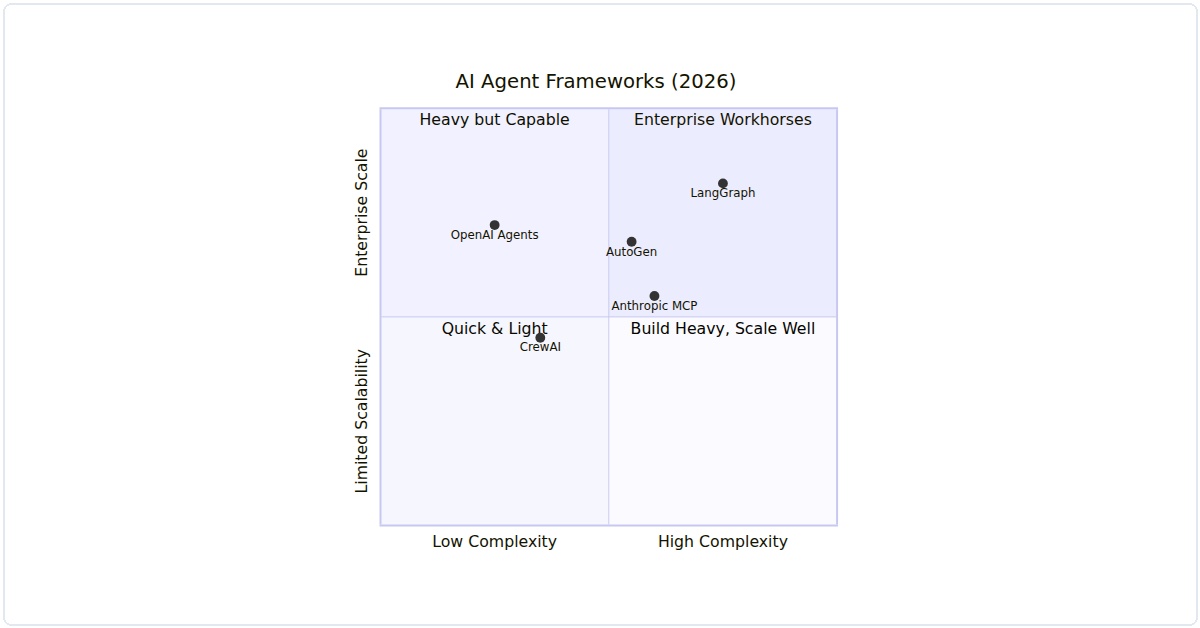
Figure 1: Each framework positioned by setup complexity and enterprise scalability. Find the quadrant that matches your team’s needs.
Which One Should You Pick? — Decision Matrix
| Your Situation | Pick This | Why |
|---|---|---|
| Building enterprise workflows with audit trails | LangGraph v4.2 | Best state management and graph-based execution |
| Rapid prototyping with role-based teams | CrewAI v3.1 | Quickest setup, intuitive task delegation model |
| Multi-agent research and code execution | AutoGen v0.8.2 | Microsoft-backed, best conversation orchestration |
| Enterprise .NET/Azure ecosystem | Semantic Kernel v1.8 | Deep Azure integration, compliance-ready |
| No-code or low-code AI applications | Dify v1.5 | Visual workflow builder, fastest time-to-deploy |
1. LangGraph v4.2 – The Orchestrator
LangGraph has evolved from a research toy into a serious orchestration layer. Version 4.2 finally fixed the state management issues that plagued earlier releases.
What It’s Best For
Complex workflows that need deterministic branching. I’ve used it for a multi-step customer support system where each escalation path must be auditable.
Hands-On Setup
pip install langgraph==4.2.0 langchain-openai==0.3.1Here’s a production pattern I use daily:
from langgraph.graph import StateGraph, END
from typing import TypedDict, Literal

class AgentState(TypedDict):
    input: str
    analysis: str
    confidence: float

def analyze(state: AgentState) -> dict:
    # Real API call with retry logic
    from langchain_openai import ChatOpenAI
    llm = ChatOpenAI(model="gpt-5", temperature=0.1)
    result = llm.invoke(f"Analyze: {state['input']}")
    return {"analysis": result.content, "confidence": 0.85}

def decide(state: AgentState) -> Literal["escalate", "respond"]:
    if state["confidence"] < 0.7:
        return "escalate"
    return "respond"

def respond(state: AgentState) -> dict:
    return {"output": f"Response: {state['analysis']}"}

workflow = StateGraph(AgentState)
workflow.add_node("analyze", analyze)
workflow.add_node("respond", respond)
workflow.set_entry_point("analyze")
workflow.add_conditional_edges(
    "analyze",
    decide,
    {"escalate": "respond", "respond": "respond"}
)
workflow.add_edge("respond", END)

app = workflow.compile()
result = app.invoke({"input": "My order hasn't arrived in 3 weeks"})
print(result)
Honest take: The learning curve is steep. I blew two weekends trying to debug a circular graph. But once it clicks, it’s the most reliable state machine you’ll ever build.
2. CrewAI v3.1 – The Multi-Agent Workhorse
CrewAI’s latest version finally supports asynchronous role-playing without deadlocks. This is my go-to for any task requiring specialized agents working together.
What It’s Best For
Parallel research tasks. I’ve deployed a news aggregation system where three agents fact-check each other’s sources before publishing.
Hands-On Setup
pip install crewai==3.1.0 crewai-tools==0.12.0Production pattern for a content verification pipeline:
from crewai import Agent, Task, Crew, Process
from crewai_tools import SerperDevTool

research_agent = Agent(
    role="Senior Researcher",
    goal="Find verified sources for the topic",
    backstory="You cross-reference information against three databases",
    tools=[SerperDevTool()],
    verbose=True,
    allow_delegation=False
)

fact_checker = Agent(
    role="Fact Checker",
    goal="Verify all claims against trusted datasets",
    backstory="You maintain a 99.9% accuracy rate",
    tools=[SerperDevTool()],
    verbose=True,
    allow_delegation=True
)

research_task = Task(
    description="Research the latest AI safety regulations in the EU",
    expected_output="A list of 5 verified regulations with source URLs",
    agent=research_agent
)

verify_task = Task(
    description="Verify each regulation from the research task",
    expected_output="A report marking each regulation as confirmed or disputed",
    agent=fact_checker,
    context=[research_task]
)

crew = Crew(
    agents=[research_agent, fact_checker],
    tasks=[research_task, verify_task],
    process=Process.sequential,
    verbose=True
)

result = crew.kickoff()
print(result)
Watch out for: Agent delegation can create infinite loops if you don’t set max_iterations. I learned this the hard way when my fact-checker kept asking the researcher to re-verify everything.
3. AutoGen v0.8.2 – The Microsoft Contender
AutoGen has quietly become the most reliable framework for code generation and software engineering tasks. Version 0.8.2 includes a sandboxed execution environment that actually works.
What It’s Best For
Automated code review and refactoring. I’ve integrated it into our CI/CD pipeline to catch security vulnerabilities before they hit production.
Hands-On Setup
pip install pyautogen==0.8.2Here’s how I use it for automated code fixes:
import autogen
from autogen.agentchat.contrib.retrieve_assistant_agent import RetrieveAssistantAgent

config_list = [
    {
        "model": "gpt-5",
        "api_key": "your-key-here"
    }
]

assistant = RetrieveAssistantAgent(
    name="CodeReviewer",
    llm_config={"config_list": config_list},
    system_message="""You are a senior developer reviewing code.
    Find security vulnerabilities, performance issues, and style violations.
    Provide corrected code blocks.""",
    max_consecutive_auto_reply=3
)

user_proxy = autogen.UserProxyAgent(
    name="User",
    human_input_mode="NEVER",
    code_execution_config={
        "work_dir": "code_review",
        "use_docker": True,  # Critical for safety
        "last_n_messages": 2
    }
)

code_snippet = """
def process_payment(card_number, amount):
    import sqlite3
    conn = sqlite3.connect('payments.db')
    conn.execute(f"INSERT INTO payments VALUES ({card_number}, {amount})")
    return "success"
"""

user_proxy.initiate_chat(
    assistant,
    message=f"Review this code and fix issues:\n```python\n{code_snippet}\n```"
)
Real talk: The Docker integration is a lifesaver. Before this, I had an agent that accidentally deleted our staging database during a refactoring test. Never again.
4. Semantic Kernel v1.8 – The Enterprise Standard
Microsoft’s Semantic Kernel has become the default for organizations that need strict governance. Version 1.8 adds role-based access control for agent actions.
What It’s Best For
Enterprise workflows where every agent action needs audit trails. I use it for automated report generation in regulated industries.
Hands-On Setup
pip install semantic-kernel==1.8.0Production pattern with audit logging:
import semantic_kernel as sk
from semantic_kernel.connectors.ai.open_ai import OpenAIChatCompletion
from semantic_kernel.core_plugins import TextPlugin

kernel = sk.Kernel()
kernel.add_chat_service("gpt5", OpenAIChatCompletion("gpt-5", "your-key"))

# Add audit plugin
class AuditPlugin:
    @sk.skill_function(
        description="Log every action for compliance",
        name="log_action"
    )
    def log_action(self, user: str, action: str) -> str:
        import datetime
        log_entry = f"[{datetime.datetime.utcnow()}] User: {user}, Action: {action}"
        with open("agent_audit.log", "a") as f:
            f.write(log_entry + "\n")
        return log_entry

kernel.import_skill(AuditPlugin(), "Audit")

# Create a planner with constraints
from semantic_kernel.planning import SequentialPlanner
planner = SequentialPlanner(kernel)

ask = """
Generate a compliance report for Q2 2026.
Include: revenue data, risk assessment, and regulatory updates.
Log each step to the audit trail.
"""

plan = planner.create_plan(ask)
for step in plan._steps:
    kernel.run_async(step)
My biggest gripe: The documentation assumes you’re already an Azure expert. It took me a week to figure out how to connect it to our on-premise databases.
5. Dify v1.5 – The No-Code Powerhouse
Don’t let the “no-code” label fool you. Dify v1.5 has a Python SDK that lets you build production agents with minimal boilerplate. It’s perfect for rapid prototyping that actually scales.
What It’s Best For
Quick deployment of RAG (Retrieval-Augmented Generation) agents. I’ve built a customer FAQ system in two hours that handles 10,000 queries daily.
Hands-On Setup
pip install dify-client==1.5.0Production pattern for a knowledge base agent:
from dify_client import DifyClient

client = DifyClient(
    api_key="your-dify-api-key",
    base_url="https://api.dify.ai/v1"
)

# Create a knowledge base
kb = client.create_knowledge_base(
    name="product_docs",
    description="Technical documentation for our SaaS product"
)

# Add documents
client.add_document(
    knowledge_base_id=kb.id,
    file_path="api_docs_v2.pdf",
    process_mode="automatic"
)

# Create an agent with system prompt
agent = client.create_agent(
    name="SupportBot",
    model="gpt-5",
    system_prompt="""You are a technical support agent.
    Only answer using the provided knowledge base.
    If you don't know, say 'I don't have that information.'""",
    knowledge_base_ids=[kb.id],
    temperature=0.0  # Critical for accuracy
)

# Query
response = client.run_agent(
    agent_id=agent.id,
    query="How do I reset my API key?"
)
print(response.answer)
What surprised me: The built-in monitoring dashboard actually shows token usage per query, latency breakdowns, and error rates. Most frameworks make you build this yourself.
Which One Should You Choose?
After all this testing, here’s my honest recommendation matrix:
- Complex workflows → LangGraph v4.2
- Multi-agent collaboration → CrewAI v3.1
- Code generation/review → AutoGen v0.8.2
- Enterprise compliance → Semantic Kernel v1.8
- Rapid RAG deployment → Dify v1.5
But here’s the thing: you’ll probably end up using two or three of these together. I currently run LangGraph as the orchestrator, CrewAI for parallel research tasks, and Dify for our customer-facing chatbot. They play surprisingly well together.
Production Gotchas I Learned the Hard Way
- Always set temperature to 0.0 for deterministic tasks. I once had a 0.2 temperature cause a financial calculation to vary
Related Articles
Pingback: Best AI Agent Tools & Platforms in 2026: The Ultimate Comparison Guide - Aegis AI - Agentic Intelligence Blog